Using OAuth
The purpose of OAuth is to authenticate users in the browser using an OAuth sign-in workflow, then obtaining a token for performing actions on their behalf. This requires a Web server to process the browser redirect from Rev.
OAuth is typically used for 3rd party applications which will integrate with Rev and require a user to provide their credentials via a user interface in real time for authentication.
This section provides a brief technical overview of how to implement OAuth with Rev. It is intended for use by software developers who have questions about how to utilize the Vbrick Rev APIs with OAuth.
For sample code on working with OAuth, jump to this page for samples.
API Key
Using OAuth requires the creation of an API Key in the Rev configuration. To create this key, the user must have administrative privileges in Rev.
To create a key:
- Login to Vbrick Rev.
- Click the Gear icon to access the admin interface.
- Select System Settings->API Keys.
- Click Add Key.
- Enter the following fields:
- Name: User-friendly name
- Key: Name of the key (to be referenced in software)
- Redirect URI: Web page that should be loaded after user enters their credentials
- Click Create.

Workflow
-
- The first step is to invoke the Rev REST API call to
/oAuth/authorization. See the instructions on the Authorization tab below. - When the
/oAuth/authorizationAPI call is made, Rev will automatically load a web page prompting the user for Rev credentials. Once the user has specified the username and password and clicked Submit, Rev will then automatically redirect the page to the redirect_uri URL specified and will append a query string containing an authorization code. This authorization code appended to the redirect URI will appear similar to:?auth_code=XXX - At this point, the application has been authenticated using the specified credentials. However, all subsequent Rev REST API calls require an authorization string to be specified in the header to identify this session.
- To build this authorization string for the header, extract the value of XXX from the query string specified when the redirect_uri page is loaded. Invoke the Rev REST API
/oAuth/tokenAPI and use XXX for the authCode parameter. See the Access Token Request tab below for details. Note carefully the example response that is returned when this API is invoked. Definitions are provided on the tab. - Build the API authorization string. IssuedBy + <space> + AccessToken.For example, the string should resemble the following:
“VBrick wkrQs6LZjNWLWBL1Qglm1t4K6fnwxZMFtB1NmMf5G1Pzv881-UUKTzxN3jdGWLbzr6WSnlrf-mCrGJgCEbxVrdOKEegbCYs4mlnOom0W0Uk1” - Include this authorization string in the header of all subsequent Rev REST API calls. This will identify the application and authenticate based on the credentials entered above.
- The first step is to invoke the Rev REST API call to
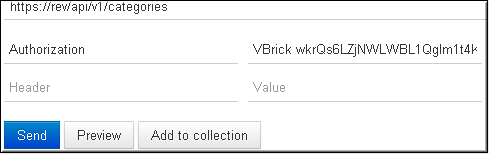
- Keep in mind, the initial login session granted via the
/oAuth/tokenAPI call will expire once the returned “expiration” date/time is reached. The same API may be used to extend the expiration date from the existing session for an additional time period with changes to grantType and refreshToken values. Please note that when a session extension is done, the accessToken will change and a new Authorization string (IssuedBy + <space> + AccessToken) must be used for subsequent API calls. See the Access Token Request endpoint for details.
OAuth Endpoints
| Method | Description | |
| GET | /oauth/authorization | OAuth Authorization |
| POST | /oauth/token | OAuth Access Token Request |